
Documentation Index
Fetch the complete documentation index at: https://fireblocks-43c4b3ee-chore-add-cli.mintlify.app/llms.txt
Use this file to discover all available pages before exploring further.
Solana Program Calls require hot wallets Solana Program Calls require a hot wallet and cannot be used in cold workspaces.
Overview of Solana transactions & programs
Solana programs are on-chain executable codes that power the decentralized applications (dApps) and other functionalities within the Solana blockchain. They enable smart contract-like behavior, allowing developers to write logic that processes transactions and manages state.Solana transactions
A Solana transaction is a set of instructions bundled together to be executed automatically on the blockchain. It typically consists of the following components:- Signatures: A list of cryptographic signatures to authorize the transaction.
- Message: The core of the transaction, which includes:
- Instructions: The set of actions to be performed. Each instruction targets a specific program on the blockchain, includes accounts to be accessed or modified, and contains any necessary data for the operation.
- Account Keys: A list of all accounts involved in the transaction.
- Recent Blockhash: A reference to a recent block to ensure the transaction is processed promptly and prevent replay attacks.
PROGRAM_CALL operation, ensuring secure transaction signing and execution.
SetAuthority instruction not allowed
Fireblocks’ policy does not allow using the SetAuthority instruction, as it may expose users to malicious activity.
Policy configuration
Solana Program Calls can be executed in Fireblocks without whitelisting any addresses if the One-Time Address feature is enabled. In this scenario, the Policy rule should include a condition for theProgram Call operation, with the destination set to Any.
For clients who prefer to work with whitelisted addresses due to security concerns and Fireblocks’ best practices, the Policy rule should be configured with the destination type set to Whitelisted only for any Program Call operation. In this case, the client must whitelist the following addresses involved in the Solana Program Call transaction:
- Any non-prewhitelisted program: Fireblocks internally whitelists certain built-in Solana programs, including: Additionally, the following Sysvar Cluster Data accounts are pre-whitelisted: Any other program must be explicitly whitelisted as an External Wallet/Contract in Fireblocks.
-
Any account designated as a destination: For the Transfer instructions (if applicable) within the
Program Calltransaction.
Practical example
When performing a SOL to USDC swap on Jupiter, the following list of programs participates in the transaction: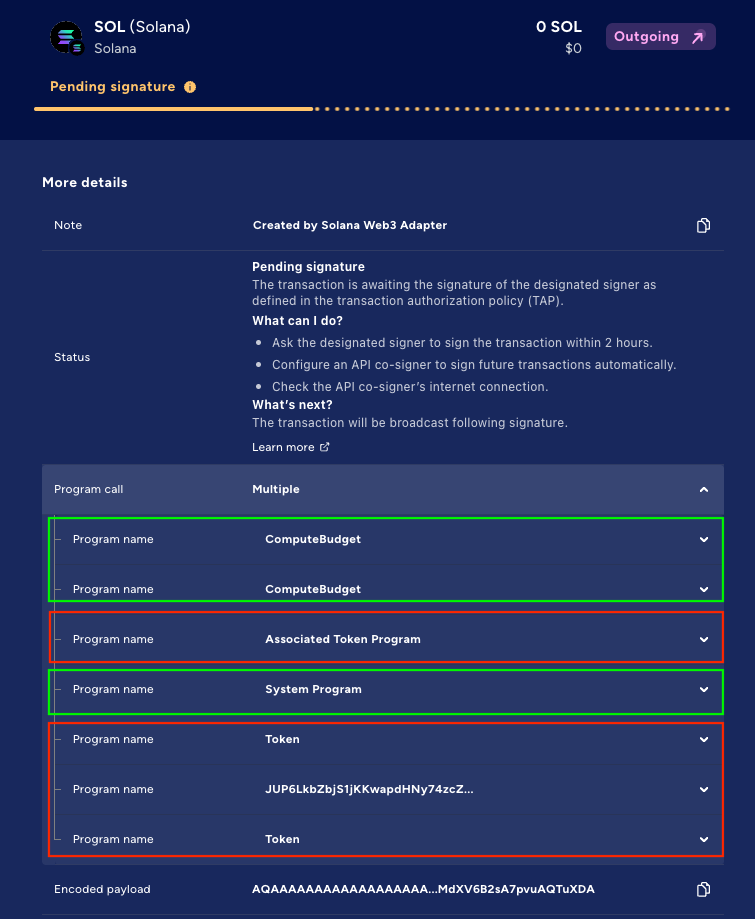 In the example above, Programs 1, 2, and 4 (Green) are automatically whitelisted. However, in this scenario, the customer must manually whitelist the following programs (Red):
- Associated Token Program
- Token Program
- Program #6, which is a custom Jupiter program
Looking for a program’s address?
You can expand a specific program’s section to view its address (the programId value).
Additionally, expanding the System Program section reveals that this program includes a single instruction: Transfer. Expanding the Transfer instruction shows that, as expected, two accounts are involved:
fromaccount (index 1)toaccount (index 2)
Program Call operation functions correctly, the pubkeyvalue of theto address must be whitelisted.
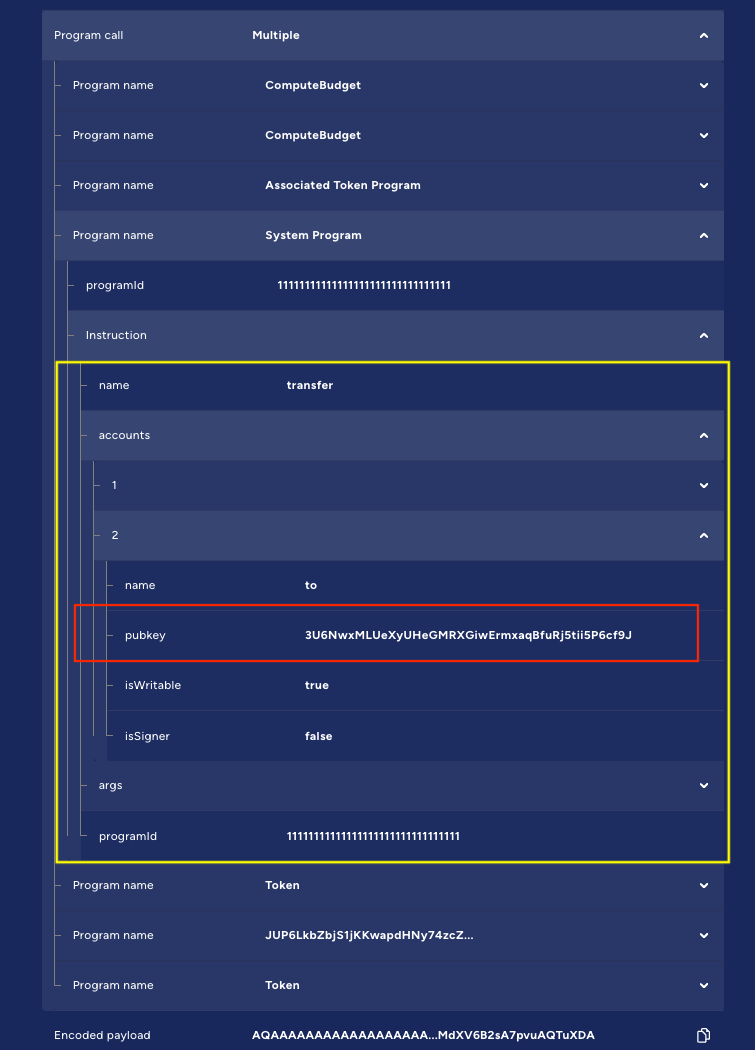
Warning: For demonstrative purposes only The addresses shown above are for demonstrative purposes only! Customers should always review and determine which addresses need to be whitelisted based on the specific Program Call context relevant to their use case.
How do program calls work on Fireblocks?
To make a Solana program call using the Fireblocks API, you will:-
Build the Solana Transaction: Use the Solana
web3.jslibrary or other tools to construct the unsigned transaction. Ensure the transaction includes all necessary instructions and accounts. Note: Fireblocks supports legacy and versioned v0 Solana transaction payloads only. Transactions built with any other message version are not supported and will fail with INTERNAL_ERROR. - Serialize and Encode: Serialize the unsigned transaction object and encode it in Base64 format.
-
Call Fireblocks API:
- Use the Create Transaction endpoint.
- Set the operation parameter to
PROGRAM_CALL. - Pass the serialized, Base64 encoded transaction object in the
programCallDataparameter within theextraParamsobject.
Example transaction structure
Below is a sample payload for invoking a Solana program using the Create Transaction API :Parameters
- operation: Must be
PROGRAM_CALLfor Solana program calls. - assetId: Use SOL for Solana mainnet transactions, SOL_TEST for devnet.
- source: The vault account ID that holds the funds and signs the transaction.
- extraParams.programCallData: The unsigned, serialized transaction object (Base64 encoded).
- extraParams.useDurableNonce: (Optional; boolean) The configurable durable nonce. The default is
true. - extraParams.signOnly: (Optional; boolean) Set to
trueto sign the transaction without submitting it to the blockchain. The default isfalse.
Durable nonce & Sign-only mode usageDurable nonce usage
By default, Fireblocks includes a durable nonce in your transaction by adding anAdvanceNonceinstruction. This ensures the transaction remains valid even if it’s not immediately submitted. Set useDurableNonce tofalseto use the recent blockhash instead. This reduces transaction size, which may be necessary to stay within Solana’s maximum transaction size limit. useDurableNonce is only used with Solana Program Calls. Other transactions do not use this field and will ignore its value.Sign-only mode usage
Use sign-only mode when you want to sign a transaction but submit it to the blockchain through another method or service. After you sign a transaction, it normally moves fromPENDING_SIGNATUREtoBROADCASTINGas Fireblocks submits it to the blockchain. When you enable sign-only mode, the transaction moves fromPENDING_SIGNATUREtoSIGNEDinstead. Fireblocks doesn’t submit the transaction, but updates its status toCOMPLETEDif the blockchain includes it in a new block. signOnly is only used with Solana Program Calls. Other transactions do not use this field and will ignore its value.
Fireblocks Solana Web3 Connection Adapter
The Fireblocks Solana Web3 Connection Adapter serves as a bridge between the Fireblocks API and the Solana blockchain, streamlining transaction submissions via Fireblocks when using Solana’s officialweb3.js library.