Documentation Index
Fetch the complete documentation index at: https://fireblocks-43c4b3ee-chore-add-cli.mintlify.app/llms.txt
Use this file to discover all available pages before exploring further.
Learn how to install SGX Co-signer in Azure in the following guide
Resources used by the SGX Co-signer
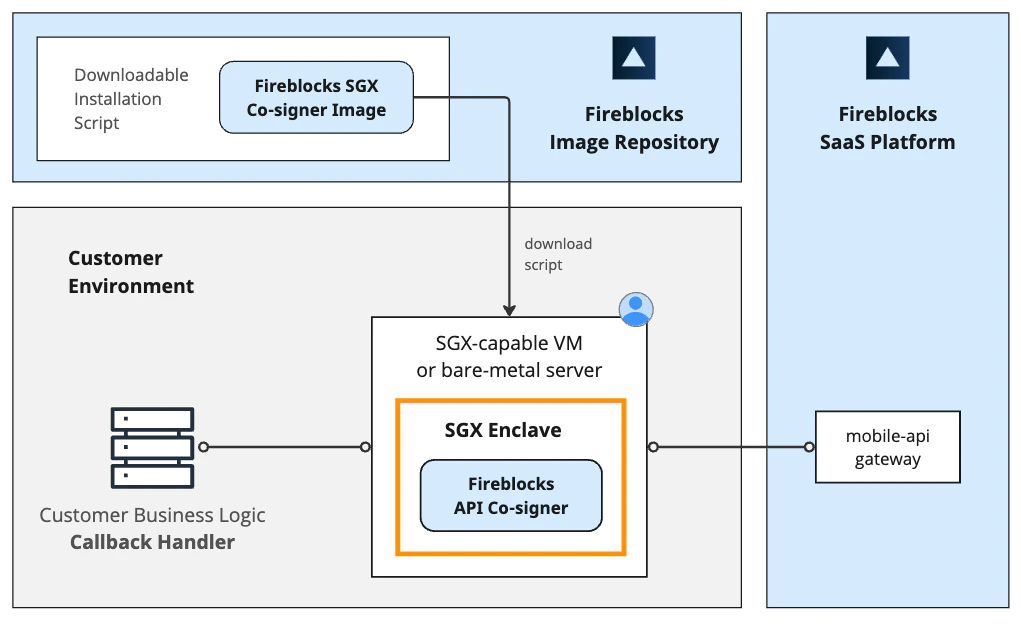
The Fireblocks SGX Co-signer utilizes Intel’s SGX enclave and attestation mechanisms. It can be deployed either in cloud service providers that support compatible SGX servers or on-premise using a bare-metal server. Also, an SGX driver must be loaded into the machine. This is the only resource that is required to install and operate the Co-signer on the host machine. The Co-signer’s database is encrypted and stored on the host machine’s disk, serving as the Co-signer’s persistent storage. This is illustrated in the block diagram below: